Check Motor Insurance Status Online: Parivahan Portal and mParivahan Application Methods Compared
24 June, 2026
A vehicle's insurance status sits in plain view in India's government databases, and anyone can pull it up with just a registration number. No login to an insurer, no policy document, no phone call. In under a minute, you can check motor insurance status online to confirm whether a car or bike is covered today or running illegally, which is exactly what you need before a long drive, a used-vehicle purchase, or a renewal you want to confirm went through.
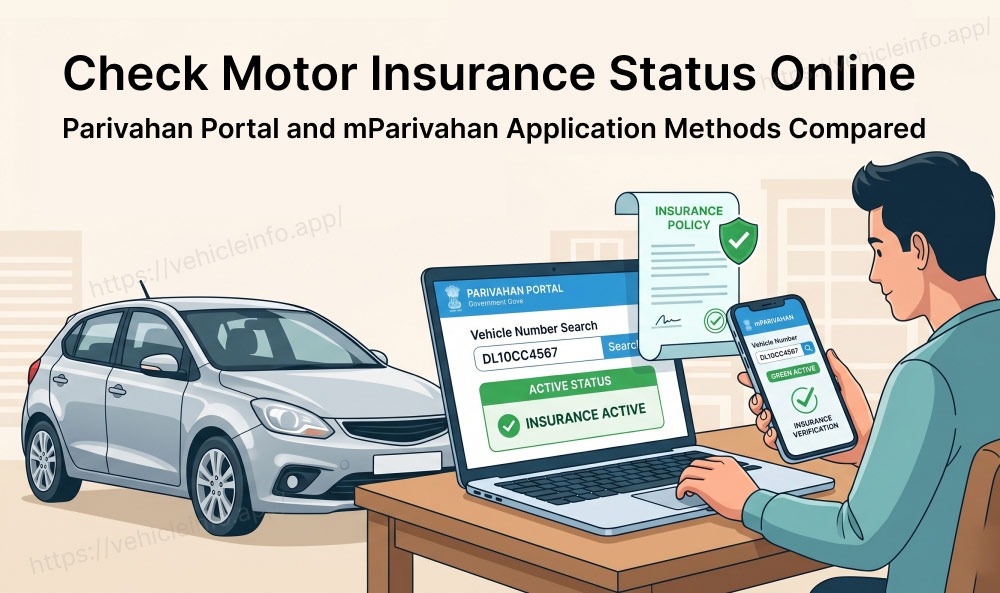
Two official channels make this possible: the Parivahan portal and the mParivahan app. Each draws from the same central pool of insurer data, so the result is consistent, though each suits a slightly different situation. Knowing which to use and how to read insurance information turns a quick check into a reliable answer.
What Does Checking Insurance Status Online Actually Verify?
When you check insurance status online, the system tells you whether a valid policy is recorded against a vehicle and when it expires. A vehicle insurance status check online also confirms the insurer's name, the policy validity date, and often the policy type. That is enough to know whether the vehicle is legally covered right now.
What an insurance status check does not do is reveal the fine print of the contract. Its job is to answer the single most important question: Is this vehicle covered or not? For compliance, a used-car purchase, or peace of mind before driving, that pass or fail outcome is exactly what matters.
The data comes from insurers, who report every policy to the central system. This is why an online insurance status vehicle lookup carries real weight. It reflects the same record the police and RTO rely on during enforcement, so knowing how to check vehicle insurance status online in India gives you the same verdict an officer would reach.
Two Official Portals for Online Insurance Status Checks
Two government-backed channels let you run an insurance status check, and all of them are free. They share the same underlying data, so pick the one that fits your situation and device.
Parivahan Portal
The Parivahan portal is part of the Ministry of Road Transport and Highways' digital vehicle services platform. It is the same portal used for RC checks, tax payments, and other vehicle services. The portal shows official information and is a reliable source for an online insurance check.
mParivahan App
For a check on your phone, the mParivahan app offers the same government data in a mobile form. It is the tool many traffic officers use at the roadside, so the status you see matches what an officer would see.
Check Motor Insurance Status on Parivahan Portal: Complete Process
The process to check bike insurance status online is the same as for a car, since two-wheelers and four-wheelers sit in the same registry. Use the Parivahan route as follows.
- Visit the official Parivahan Sewa website.
- Open the information services menu on the navigation bar.
- Select the option to know your vehicle details.
- Log in with your mobile number or create an account if you are new.
- Enter your bike/car registration number and the verification code.
- View the returned record, which includes the insurance details.
The output shows the insurer and validity date for the two or four-wheeler. This lets you check two wheeler insurance status online in the same minute it takes for a car, which is handy if you own both and want to confirm cover on each before heading out. A vehicle insurance status check online works identically across both vehicle types.
Check Motor Insurance Status on the mParivahan Application: Complete Process
The process to check motor insurance status online on the mParivahan application is as follows:
- Download and install the mParivahan App on your smartphone.
- Launch the App and Set the Language.
- Select "Check Vehicle Status" Option.
-
Enter Vehicle Details:
You have two options to identify your vehicle:
- By Registration Number: Enter your vehicle's registration number and click search.
- By Driving License: Enter your driving license number and click search.
- Access Insurance Details.
Understanding the Result: Active, Expired, Not Found
Every insurance status check ends in one of three outcomes. Reading them correctly is the whole point of the exercise.
| Result | What It Means | What to Do |
|---|---|---|
| Active | Valid cover with a future expiry date | You are compliant, note the renewal date |
| Expired | The validity date is in the past | Renew at once, the vehicle is uninsured |
| Not Found | No record returned | Likely a sync delay, recheck and cross-verify |
An active result is the clear pass. An expired result is a clear fail, meaning the vehicle is uninsured today regardless of any past cover. A not-found result is the ambiguous one, and it usually points to a data delay rather than a genuine absence of cover.
Why Insurance Status May Show Wrong Data
The databases are not updated in real time, so a check can occasionally show data that does not match reality. Knowing the common causes stops the wrong conclusion.
Insurer Upload Delays
Insurers report policies to the central system in batches, not instantly. A newly issued policy can take a few weeks to appear in the Parivahan and mParivahan applications. So a recent purchase may show as not found even though valid cover exists.
Policy Not Updated After Renewal
A renewal faces the same delay. You may renew on time, yet the system still shows the old expiry date for a short while until the renewal data syncs. This does not mean your cover lapsed. It means the database has not caught up. During this window, your policy document is the authoritative proof, not the lagging online record.
What to Do If Your Insurance Shows Expired on Parivahan but Your Policy Is Active
This is a common worry, especially just after a renewal. If you hold a valid policy but the Parivahan insurance status check shows expired or not found, the cause is almost always a sync delay.
Take a measured approach. First, wait a few days and recheck, since fresh data takes time to appear. Second, cross-verify on the insurer’s website, which sometimes holds records the registry has not yet pulled. Third, keep your policy document handy, because the document overrides a lagging database during any roadside check. A digital copy on the mParivahan app or DigiLocker is accepted as valid proof.
If the record still shows wrong after a few weeks, contact your insurer and ask them to push the policy data to the central system. The fault usually lies in the insurer's reporting, and they can correct it. Until then, your document protects you.
Legal Proof of Insurance: Status Check vs Policy Document
An online check and a policy document prove different things, and knowing the difference keeps you confident at a checkpoint. The online insurance status check proves what the central database currently records about a vehicle. It is fast, public, and matches what the police see, but it can lag reality.
The policy document, by contrast, proves the exact terms of your contract, including the precise cover and the named insured. It is authoritative on detail and does not depend on the database being synced. For enforcement, a digital copy of the document on the mParivahan app or DigiLocker is accepted as valid proof, even when the registry lags behind.
The smart approach uses both. Run the insurance status check to confirm the cover exists in the official record, and keep the document to prove the terms and protect yourself during the sync window.
Who Can Access Vehicle Insurance Status?
Anyone can check insurance status online for any vehicle using its registration number. The data is public by design, which is why a used-car buyer, an accident victim, or a cautious owner can all run the same lookup.
This openness serves a purpose rooted in law. The Motor Vehicles Act treats insurance as a matter of public protection, so accident victims can trace an insurer to claim compensation, and buyers can confirm a vehicle is genuinely covered. Because of this, you do not need to own the vehicle to check car insurance status on it.
There is a privacy balance, though. The check reveals cover status and the insurer, not sensitive personal details of the owner. So you get what you need to make a decision or pursue a claim, without exposing private information.
Frequently Asked Questions
1. How can I check vehicle insurance status online in India?
Ans: If you are wondering how to check vehicle insurance status online in India, there are two official routes: the Parivahan portal and the mParivahan app. Enter the registration number and verification code, and the system returns the insurer and validity date.
2. Is the insurance status check online free?
Ans: Yes. Every official channel for an insurance status check is free of charge. The government portals, and even the insurer website do not charge to check car insurance status, so any site asking for a fee is not the official route.
3. How do I check car insurance status by registration number?
Ans: Enter the registration number on Parivahan or Parivahan after logging in with your mobile number. The car insurance status check by registration number returns the insurer name and validity date, which is enough to confirm whether the cover is active.
4. How do I check bike insurance status online?
Ans: The process to check bike insurance status online is identical to a car, since both sit in the same registry. Use Parivahan or Parivahan, enter the two-wheeler's registration number, and the online insurance status vehicle result shows the insurer and expiry date. You can check two wheeler insurance status online the same way you would for a four-wheeler.
5. What does each result mean?
Ans: An active result means valid cover. An expired result means the vehicle is uninsured today. A not-found result usually means a sync delay rather than no cover. Reading these correctly is the core value of any insurance status check.
6. Why does my insurance show expired when my policy is active?
Ans: It is almost always a sync delay. Insurers report policies in batches, so a renewal can take time to appear. If a Parivahan insurance status check shows expired but your policy is valid, recheck later, cross-verify on the insurer's website, and keep your document as proof.
7. How long does a new policy take to show online?
Ans: A new policy can take a few weeks to appear in Parivahan and the mParivahan App. So an online insurance status vehicle check may lag just after purchase. Patience and cross-verification handle this gap.
8. Does an online check replace my policy document?
Ans: No. The insurance status check proves the cover exists in the official record, but the document proves the exact terms. For roadside checks, a digital copy on the mParivahan app or DigiLocker is accepted as valid proof.
9. Can I check car insurance status for someone else's vehicle?
Ans: Yes. You can check car insurance status for any vehicle using its registration number, because the data is public. This helps used-car buyers and accident victims, while sensitive owner details stay private.
10. Which portal is most reliable to check insurance status online?
Ans: Parivahan is the most direct, since the police and RTO use the same database. To check insurance status online with a backup, cross-verify on mParivahan, which draws straight from insurer data and sometimes shows records Parivahan has not yet pulled.